AJO Personalisation guide
Table of contents
In a real-time system, integrating personalization often introduces a level of complexity that might be overlooked during the transition from a workflow-based system. Nevertheless, the significance of personalization cannot be overstated in ensuring that marketing efforts resonate with audiences. Consider these compelling statistics:
71% of consumers express frustration when their shopping experiences lack a personal touch (Segment).
70% of millennials are annoyed by receiving irrelevant emails from brands (SmarterHQ).
74% of customers feel dissatisfied when website content isn’t tailored to their preferences (Instapage).
These statistics highlight the considerable portion of audiences seeking content that's not just relevant but also contextual and personalized to their needs. With this in mind, let's shift our focus to understanding how we can deliver personalized content to consumers through AJO for activation:
Step 1) Data, data, data
Profile attributes - Attributes
AEP supports a wide range of attribute types, far too many to list in this blog. So we’ll focus on “simple” attributes and Objects. When referring to simple attributes, we mean anything at a profile that’s stored as a “flat” attribute. i.e. First name, stored as a string would be considered a "simple” attribute in this context. Whereas an Array of strings would not be considered “simple” as it requires techniques referenced later in this blog to access, manipulate and personalize with.
Profile attributes - Arrays
Arrays are extremely useful datatypes to leverage when building out a data model to support personalization in AJO. Those of you who perhaps do not have a background in programing and development, the key thing to note here is that an Array can have multiple values stored within the same structure. For example, if we modelled “first name” in an Array to allow customers to have multiple names or even nick names, this is how it would look when compared to a “simple” attribute described above.
orgName.profile.firstname = “Mark”
orgName.profile.firstnames[‘Mark’,’Marcus’,’Marky’]
The key thing to note here is that in order to store those three values for a profiles first name, using simple attributes would require three distinct fields i.e. firstname1, firstname2, firstname3. That’s very impractical and won’t scale if such a requirement did exist. Every time a customer adds a new first name that exceeds the current number of supported values (three in this case), a change would need to be made, a data fix applied, resulting in a total mess…
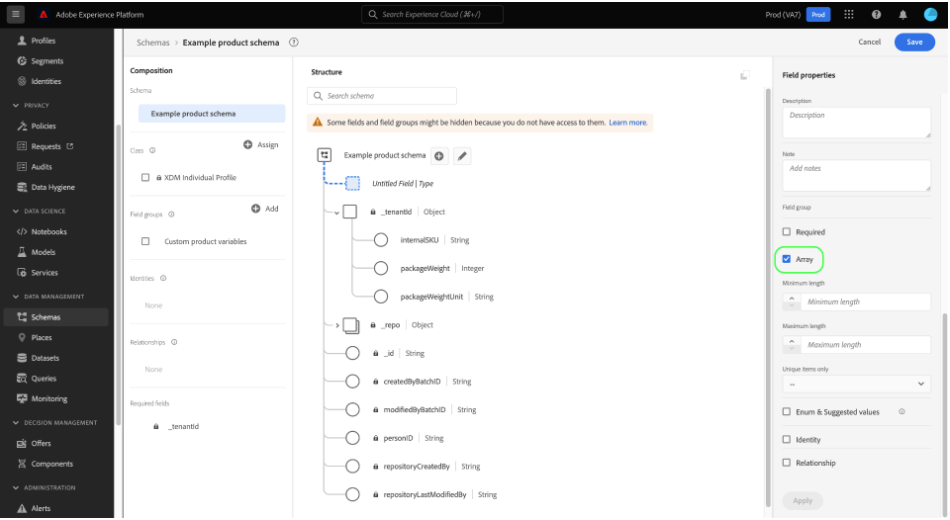
When creating an Array it’s important to tick the checkbox circled above.
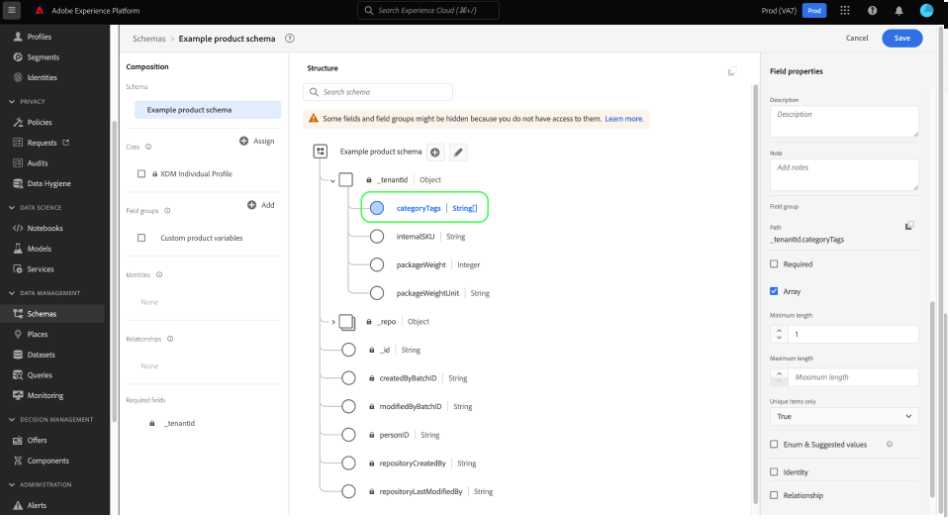
Once set to an Array, the UI will update the data type with a set of square brackets “[]” to indicate this attribute has been set as an array.
Contextual data - events
The last piece of the data puzzle for this discussion involves the use of contextual data via events, or more specifically Experience Events. This requires the use of an Experience Event class rather than using the profile class. This is important to note as this allows for data to be streamed into AEP in real-time using the Kafka pipeline(s). That’s a conversation for another blog as lifting the hood on Kafka quickly progresses into a very technical conversation. However, that’s something I shall cover at a later date!
Experience Events are streamed into AEP and crucially, AJO can be configured to “listen” for events of a certain “shape”. This is important because this allows us to target customers in real-time using the data contained within these events and data available at the profile, at that time. That’s another important note as when customers migrate from a workflow based system to a real-time system, typically the challenge of speed and availability creep into the conversations. This is because, targeting a profile using data that’s arriving in real-time requires an understanding of the “state of a profile” and the potential states that data can be in at that exact second. An example of this is, if a customer is registering for a product, service, loyalty scheme etc. and a journey is listening for this “registration event”, we need to have processes in place to ensure things such as consent, email address, content preferences are available for use within any contextual communications. There are a myriad of ways to solve this and ensure we’re using the right data at the right time.
The right approach really depends on the use-case and the requirements but one simple way to ensure data is available, is to pass this within the registration event. This allows AJO to consume and utilize this data for contextual personalization. However, the drawback is that other processes will need to be robust enough to ensure the profile is updated accordingly after communications have been sent. This for some customers is not possible and introduces far too much risk. As with all solution design, it’s a battle of give and take to ensure an acceptable solution is developed.Creating an Event is straight forward enough, before creating an Event you’ll need to complete a few pre-requisites and have thought about the data being streamed to AEP:
First, you’ll need to setup a new Schema using the Experience Event class. I won’t recap the steps for this as there’s a wonderful guide here.
Second, you’ll need to decide the business rules required to identify which Events to “listen” for - there can be millions of events streaming into AEP at any one time. Knowing which ones need to be used to trigger a journey requires “conditions” to be set using event attributes to identify those which are meaningful / important.
Finally, a decision would need to be made as to whether the event should be a business event or a unitary event. Business events allow external systems to tell AEP that a specific event has occurred and that all profiles who may find that event interesting should be notified. The use-case example here is a product has been restocked and a list of profiles have added themselves to a “watch list”. The other Event type is a Unitary event. This means AEP has been configured to listen for specific attributes within an event and to trigger a personalized journey for the profile associated with this event once those attributes have been spotted. A use-case example of this is that once a profile moves to “Gold” membership level, an event is streamed into AEP with membership status = “Upgrade” and membership level = “Gold”.
If you have a background in software engineering, event triggered journeys such as this are different implementations of the “Observer” pattern. The key difference being that with business events there’s an audience or list configured for targeting and unitary allows for triggering to happen for a single profile.
Step 2) Implement conditional and journey canvas filtering.
General usage - conditional filtering

Personalization can be applied within the journey canvas, even if this simply refers to filtering or journey logic, this is another example of personalization being applied within the context of AJO. The above screenshot shows an example of logic being applied using an Array, in this example, we’re checking position 0 of an Array for a specific value. This would then allow the profile to proceed through a different path within the experience.
Wait / conditional waiting
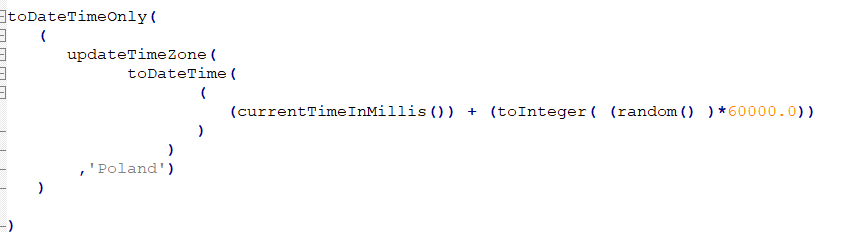
The above shows use-case 1 from the below list, this function will apply a random wait time timestamp to each profile between the current time and 60000 milliseconds.
A level of personalization which is often overlooked, is the concept of personalization based on preferred contact time, this is a practice often referred to as “Send-time optimization” and Adobe have created various AI / ML algorithms to deliver such functionality. AJO has this feature available via feature-flag enablement, speak to your Adobe representative to have this enabled and this document is useful. However, STO aside, it’s often overlooked or seldom thought about when planning communication plans. Within the context of AJO, we’re able to build out an enormous amount of time-based use-cases. AJO handles time zone targeting via the journey time zone or using the profiles time zone. Additionally, we’re able to use custom wait configurations to build out two use-cases to name but a few.
1) Random wait per profile - this personalization allows us to apply a random time for profiles to wait to, this allows us to create a “trickle effect”. This doesn’t replace proper throttling requirements but is handy when trying to add an element of randomness into journeys.
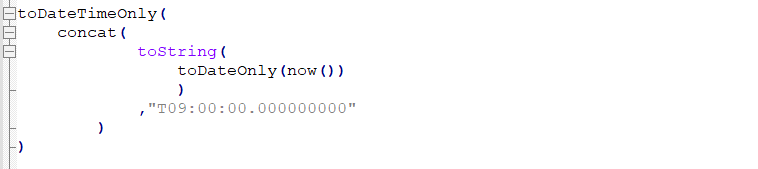
2) Wait until a specific time, using a relative date time - this solution allows marketers to set wait times using the current server time (i.e. the now function). Ultimately this caters towards read segment based journeys where the evaluation time is not fixed.
Step 3) Implement email personalization strategies.
The following section of this blog, focuses on two specific helper functions available within the AJO personalization UI. Namely, EACH and IF. Documentation is available here and it’s certainly worth taking a look at this documentation.
EACH function
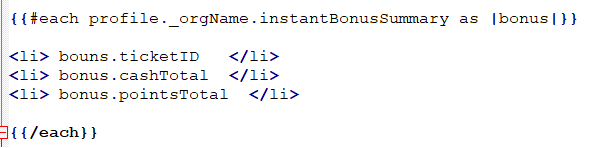
The EACH function allows for iteration over collections. Those with a background in development will notice this is essentially a forEach loop. We’re able to iterate through a collection, with an index automatically incremented at each “step” and the attributes within each index of the collection are available for use individually at each step. Control of iteration is handled by the EACH function so there’s no need to build in exit criteria as the entire collection is iterated through. However, it’s important to note this as additional checks / logic may need to be applied between the “each” tags to ensure the correct data is presented during the personalization stage.
The below screenshot shows an example where a collection “instantBonusSummary” is declared as an object[] in AEP, the each function iterates through this and simply prints out a list of items at each iterations. If this array had 10 items in the collection, the ticketID, cashTotal and pointsTotal would be printed out within the body of the email 10 times.
IF function
The IF function is a staple within any logical based language and within AJO that’s no exception. This function allows for logical checks that evaluate to TRUE. For example, IF(today == Christmas day) then print “Merry Christmas!!”.
That condition will evaluate to TRUE only 1 day per year, the rest of the time it will return FALSE and as such we won’t print “Merry Christmas!!” in that case.
The below example is accessing the array and performing a “count” operation on the array. If this returns a value greater than 1, this would evaluate to TRUE and as such the text below would be printed.

Conditional iteration
Now, in some cases as mentioned above you may need to provide some additional checks to ensure that when iterating through an array each element meets specific business conditions.
The below example combines both EACH and IF functions together, we embed the IF function inside the {{each}} tags to ensure that the IF statement is performed for each item in the array (this is critical).
In this example, we iterate through the instantBonusSummary again. However, this time, for each iteration we check that the expiry date of each “bonus” item is less than 25 days in the future. In this example, if we had 10 items in the array and all of those were expiring greater than 25 days in the future then nothing would be printed in the email. In such an example, it’s worth having logic outside of the {{each}} tags to support cases where no interesting content is to be printed otherwise you can end up sending emails with bad content and that’s infantilely worse than sending nothing!

Example of using IF and EACH functions together to iterate through an Array.
In summary, personalization is incredibly valued by customers and this trend is only increasing as younger generations who have been raised in an environment where personalization is normalized begin to fall into our target audiences. It’s difficult to get right in some cases and requires effort. However, customers expect this and failing to try is worse than simply not bothering!
Finally, If you’ve made it this far, firstly, I thank you for your focus, attention and patience. I hope you’re able to take something away from this guide. However, I’m always open to feedback and would love to hear your thoughts on any future blogs you’d be interested in seeing. Suggestions can be made through the contact us page or via linkedIn.